Git 的使用筆記
Basic Function
1. $ git clone ssh://briankuo@gerrit.server.com.tw:123456/directory/2. modify filename.c
3. $ git add filenmae.c // set filenam.c to stage
4. $ git commit filename.c // commit filename.c to local repository
5. $ git push //push local master to remote master (origin/master)
(git push origin HEAD:refs/for/master // code review)
6. $ git rm --cached filename.c //untrack file
7. $ git reset HEAD filename.c //把檔案從 “Changes to be commited” 中移除, 不會動到檔案內容 , 只是git 中的狀態(stage)
8. $ git checkout -- Makefile //把檔案中變動的內容恢復
Message Hook
因為push 到遠端的時候 , 需要標明commit時產生的 Change-Id .
可以手動打或是在 .git/hooks/ 中加入一個檔案 commit-msg
Code Review
原本"git push" 改成 "git push origin HEAD:refs/for/master"master和HEAD的區別
???
Other Command
git status
git diff
git remote
顯示clone時的預設名稱 origin , origin 是遠端倉庫的預設名稱
git remote -v 顯示url (也就是clone時輸入的那串)
git log
顯示目前這個branch的commit message, 已經分出去的branch就看不到.git fetch origin
同步遠端伺服器上的資料到本地 , 但是不會merge . 另外變成一個remote branchgit pull
包含兩個指令(git fetch)+(git merge origin/master)git 簡單的流程
2015/11/26 補充 : 底下關於checkout不太正確 , 實驗發現應該要
1. (Stage 回到 Working) : git reset HEAD ./src/dhcp.c
2. 把最近一筆commit取消(修改還在) : git reset HEAD^
3. 把檔案恢復到未修改前的狀態 : git checkout ./src/dhcp.c
3. 把檔案恢復到未修改前的狀態 : git checkout ./src/dhcp.c
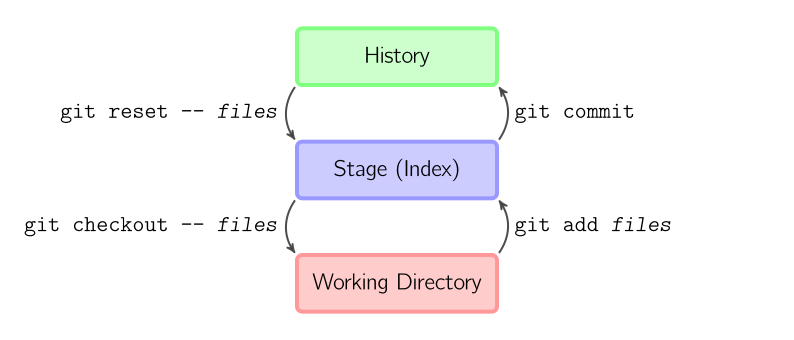
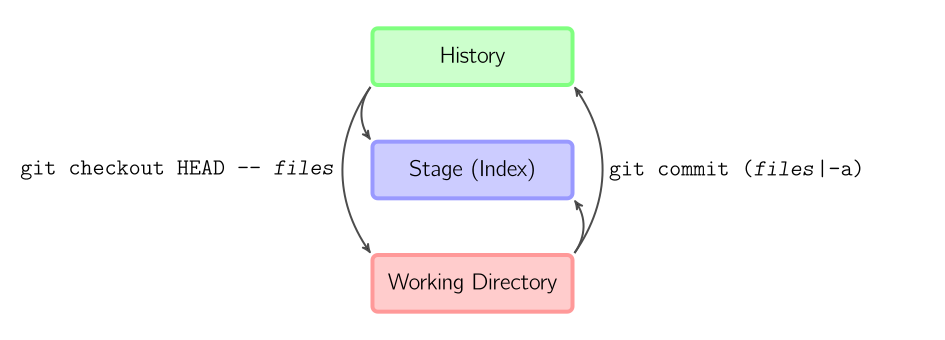
ref : https://marklodato.github.io/visual-git-guide/index-zh-cn.html

沒有留言:
張貼留言