2015年4月14日 星期二

Git push Command

git push

  Works like git push <remote>, where <remote> is the current branch’s remote (or origin, if no remote is configured for the current branch).

git push origin
  git push到變數"remote.origin.merge"所指定的地方.

got push origin :

   push到遠端的origin

git push origin master

   ???

git push origin HEAD

   A handy way to push the current branch to the same name on the remote


git push origin HEAD:master   

    Push the current branch to the remote ref matching master in the origin repository. This form is convenient to push the current branch without thinking about its local name.

git push origin master:refs/heads/experimental

   Create the branch experimental in the origin repository by copying the current masterbranch. 

2015年3月11日 星期三

UML Class Diagram 介紹

ref : http://puremonkey2010.blogspot.tw/2010/10/oo-uml.html
       http://www.kenming.idv.tw/uml2_0_class_e_object_diagram_cdia_rcm_a

2015年3月10日 星期二

uCOS : Task間的通訊與同步


                                                                    Tasks 有五種狀態


  • dormant
  • ready
  • running
  • waiting
  • ISR(interrupted)

Context Switch

Each Task 有自己的set of CPU register(放在 Task's Context storage area,又稱為TCB(Task Control Block)) 和 stack area. TCB 和 stack都在memory中.
當要做 Context switch的時候 , CPU register  會被放到 TCB中.

Kernel

Kernel 負責管理各Task , 和Context switch.

Non-Preemptive Kernel

Non-Preemptive Kernel允許使用non-reentrant functions(non-reentrant functions 不應該放棄CPU的控制權).


  • ECB(Event Control Blocks) :  一個Task可以透過ECB像另外一個Task發送訊息 , 所有的訊號都被視為 Event (無論是 Semaphore/Mailbox/MessageQueue).
    • 從Source code中來看 , 建立semaphore 是從 OSEventFreeList 中拿一個物件出來 , 設定成semaphore 的參數 (所以ECB的數量是有限的).  
  • ISR(Interrupt Service Routine) 不能等待 Event ,  只能發送 Event.
  • ucos_ii.h中所定義的 typedef struct os_event  ,  就是上面說的ECB.

2015年2月4日 星期三

Git Merge

Git的合併方式分成四種

  • Straight merge 
  • Squashed commit 
  • cherry-pick 
  • rebase

git merge 的指令

git merge <branch_name> :
合併另一個 branch,若沒有 conflict 衝突會直接 commit。若需要解決衝突則會再多一個 commit。
git merge --squash <branch_name>
將另一個 branch 的 commit 合併為一筆,特別適合需要做實驗的 fixes bug 或 new feature,最後只留結果。合併完不會幫你先 commit。
git cherry-pick <commit-id> 
只合併特定其中一個 commit。如果要合併多個,可以加上 -n 指令就不會先幫你 commit,這樣可以多 pick幾個要合併的 commit,最後再 git commit 即可。


Fast-forward 

fast-forward 在 Git 是一種 merge 術語,當 B branch (例如一個 local branch) 是從 A branch (例如一個 remote branch) 的最新版(HEAD)分支出來的,那當 A 要把 B merge 進來時,因為 B 的 parent commit 是 A 的 HEAD,所以這兩個 branch 唯一的差異就是 B 後來的 commit 而已,而不會有任何 conflict。所以實際上的動作只要把 A 的 HEAD 改成 B 的 HEAD 就好了,線圖上這兩個 branch 根本是同一條線,此謂 fast-forward


master和 origin/master就是fast-forward.


20151126補充
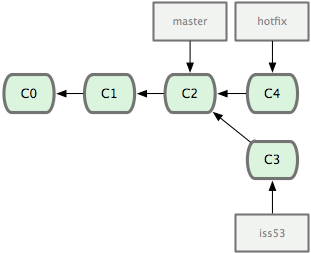
master(原本的)和 hotfix(多一個commit)就是fastforward , 所以只需要執行
$ git checkout master $ git merge hotfix


Conflict 

當user1 , user2 同時clone一份 (test1),然後各自修改後push上去
user2 搶先push , 所以成功 . 之後 user 1 再push 就會出現錯誤 . server要求先pull.
但是此時user1執行pull , 也會失敗 , 警告為 Automatic merge failed.
此時就要用 fetch
$ git fetch #但是我看到的是 衝突檔案被修改, git 直接幫我標出 conflict的地方.(我以為會變成另外一個branch?) 
手動修改衝突的檔案後 , commit/push上去之後變成


這時候原本先push上去的user2 會發現變成這樣.

這時候只要 $git pull origin master 即可


附註 =======================

又再做一次實驗 ,user2先push上去
user1 這次用 
$ git fetch origin


可以看到 , 多了一個分支 origin/master , 衝突檔案也沒有被直接修改. 
這時候 , 先切換到 /origin/master ,(指令 : $ git checkout origin/master)
然後把我們的master合併過來(指令 $ git merge master)
直接在master branch合併 (指令 $ git merge origin/master)

可以看到合併 , 但是會有conflict , 手動修改檔案後再push上去.


這時候回去看user2的--------------------------------

local/master 已經落後origin/master , 但是不在同一個branch


只要直接pull下來就好


ref: https://ihower.tw/blog/archives/2620  

2015年2月3日 星期二

Git remote branch

Git Remote Branch

從Clone階段開始看

Clone 之後 : 
Git 會自動為你將此遠端倉庫命名為 origin,並下載其中所有的資料,建立一個指向它的master 分支的指標,在本地命名為 origin/master . 
接著,Git 建立一個屬於你自己的本地 master 分支,始於 origin 上 master 分支相同的位置,你可以就此開始工作


和remote端分流之後

 local端修改之後 , remote也有別的開發者push新的版本上去. 於此同時,你在本地的提交歷史正朝向不同方向發展。不過只要你不和伺服器通訊,你的 origin/master 指標仍然保持原位不會移動.

同步遠端伺服器資料到本地

 該命令首先找到 origin 是哪個伺服器(本例為 git.ourcompany.com),從上面獲取你尚未擁有的資料,更新你本地的資料庫,然後把origin/master 的指針移到它最新的位置上


Pull from remote Branch

 $ git pull origin master

Push local branch

如果你有個叫 serverfix 的分支需要和他人一起開發,可以運行 git push (遠端倉庫名) (分支名)
$ git push origin branchA 
  • 其實Git 自動把 branchA 分支名擴展為 refs/heads/branchA:refs/heads/branchA  意為“取出我在本地的branchA 分支,推送到遠端倉庫的 branchA分支中去”
  • 也可以運行 git push origin serverfix:serverfix 來實現相同的效果 , 它的意思是“上傳我本地的 serverfix 分支到遠端倉庫中去,仍舊稱它為 serverfix 分支”
所以也可以把本地branchA push上remote brachB
$ git push origin branchA : beanchB

跟蹤遠端分支

 跟蹤分支(tracking branch)是一種和某個遠端分支有直接聯繫的本地分支。在跟蹤分支裡輸入 git push,Git 會自行推斷應該向哪個伺服器的哪個分支推送資料。
當第一次clone下來一個remote repository時 , Git 通常會自動創建一個名為 master 的分支來跟蹤 origin/master。這正是 git push 和 git pull 一開始就能正常工作的原因
或是可以手動建立一個追蹤分支
git checkout -b [分支名] [遠端名]/[分支名]


刪除遠端分支

刪除remote端的branchA  : 
git push origin :[分支名]


from : http://git-scm.com/book/zh-tw/v1/Git-分支-遠端分支

2015年1月29日 星期四

Git 的使用筆記

Git 的使用筆記

Basic Function

    1. $ git clone ssh://briankuo@gerrit.server.com.tw:123456/directory/
    2. modify filename.c
    3. $ git add filenmae.c  // set filenam.c to stage 
    4. $ git commit filename.c // commit filename.c to local repository 
    5. $ git push //push local master to remote master (origin/master)
         (git push origin HEAD:refs/for/master // code review)

    6. $ git rm --cached filename.c //untrack file 
    7. $ git reset HEAD filename.c //把檔案從 “Changes to be commited”  中移除, 不會動到檔案內容 , 只是git 中的狀態(stage)
    8. $ git checkout -- Makefile //把檔案中變動的內容恢復


Message Hook

       因為push 到遠端的時候 , 需要標明commit時產生的 Change-Id  . 
       可以手動打或是在 .git/hooks/ 中加入一個檔案 commit-msg

Code Review

        原本"git push" 改成 "git push origin HEAD:refs/for/master"

master和HEAD的區別

        ???

Other Command

     git status

     git diff

     git remote

           顯示clone時的預設名稱 origin  ,  origin 是遠端倉庫的預設名稱
           git remote -v 顯示url (也就是clone時輸入的那串)

     git log

          顯示目前這個branch的commit message,  已經分出去的branch就看不到.         


     git fetch origin 

          同步遠端伺服器上的資料到本地 , 但是不會merge . 另外變成一個remote branch

       git pull 

             包含兩個指令(git fetch)+(git merge origin/master)


     git 簡單的流程

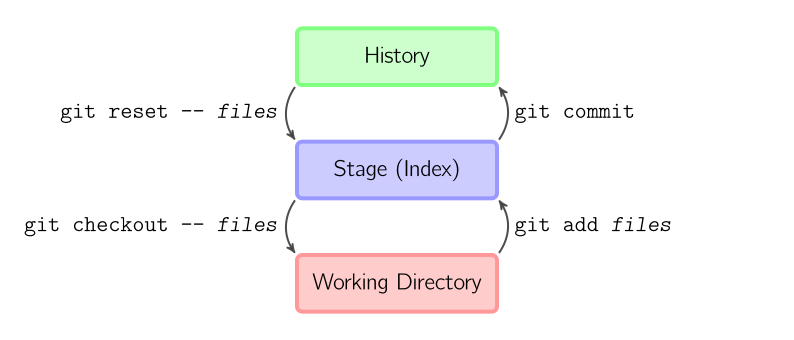
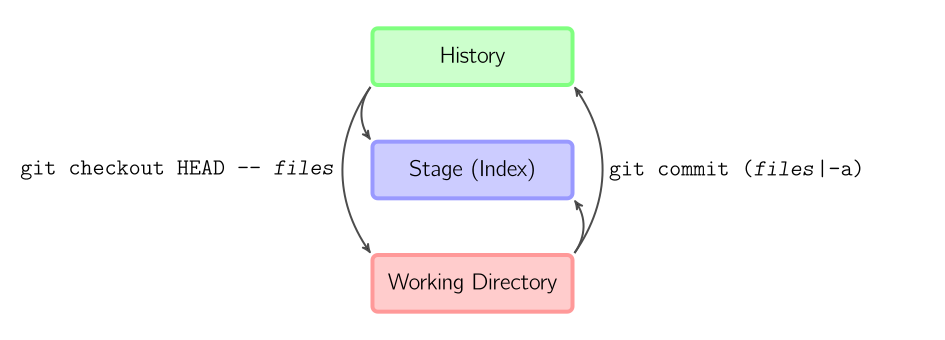
             2015/11/26 補充 : 底下關於checkout不太正確 , 實驗發現應該要
                           1. (Stage 回到 Working) : git reset HEAD ./src/dhcp.c
                           2. 把最近一筆commit取消(修改還在) :  git reset HEAD^
                           3. 把檔案恢復到未修改前的狀態 : git checkout ./src/dhcp.c


ref : https://marklodato.github.io/visual-git-guide/index-zh-cn.html


Git Branch / Tag / 檔案操作

Git Branch

Git的好處是可以再本地端開branch , 不會影響到遠端(Server端)的Repository


列出目前的branchgit branch
建立本地 local branchgit branch <new_branch_name>
切換branchgit checkout <new_branch_name>


git branch branchname  : 建立新的branch , 叫做branchname
git checkout branchname : 切換到 branchname
git branch : 顯示local的所有branch
git branch -r : 顯示remote的所有branch
git branch -d <branch_name> : 可以刪除 branch。但如果要刪除的 branch 還沒有合併,就會有錯誤訊息。如果真的要強制刪除可以用 -D
git branch -a : 顯示出所有「本地分支」與「本地追蹤分支」。「本地追蹤分支」就是紅字的部分(brian:本地追蹤分支應該就是遠端的branch )


git 檔案操作

git checout filename    :   會把檔案恢復到前一次commit , (當檔案在 modified status , unstage)
git reset filename : 檔案從stage恢復成 modified status.
git rm --cached filename : 檔案變成 untracked , 這個動作還是要commit
git rm filename  會真的移除檔案
git mv filename_from filename_to 


git tag


git tag : 列出現有標籤
git tag -l "Tname" : 搜尋名稱為"Tname"的tag

git tag -a "Nname"  : 增加一個tag 在目前的位置
git tag -a "Nname" commit-id增加一個tag 在指定的commit版本 , commit只要輸入前面幾個byte

git push origin tagA  : 把local的tagA push上去remote

git stash


Git的官方文件 : http://git-scm.com/book/zh-tw/v1/%E9%96%8B%E5%A7%8B ref : https://ihower.tw/blog/archives/2620

2015年1月22日 星期四

指定編譯時的記憶體配置

@ linker.ld.c //.conf section 放在memory 0x8b020000 , 長度為64K

MEMORY
{
    sram   :  o = 0x8A000000, l = 95k
    boot   :  o = 0x8A020000, l = 32k
    flash  :  o = 0x8B030000, l = 384k
    conf   :  o = 0x8B020000, l = 64k
    wake   :  o = 0x8B022000, l =  8k
}

@ somedef.h

#define _ATTRIBUTE_CONF   __attribute__((section(".conf")))

@const.c // 把型態為 DPCONF 的 dpset   , 放在 section ".conf"

DPCONF dpset _ATTRIBUTE_CONF = {
     .HostIP.addr = 0x0A00A8C0,
    .SubnetMask.addr = 0x00FFFFFF,
    .GateWayIP.addr = 0xFE00A8C0,
}

這是

2015年1月7日 星期三

objdump 教學


objdump常用指令

-D/d/S: .a是一個靜態lib , 裡面可能包含多的 .o 檔
         這個指令會把裡面包含的.o 列出 , 還有.o的 format

-s   :   Display the full contents of all sections requested

-t    :   列出所有的symbol , 依各.o 分別列出.


-h    :  列出每個.o中的secton. (Link的時候會把所有.o檔的section統一放一起 ,e.g. 把所有的.txt集合起來)

e.g. 

objdump  -t libbsp.a   
                                                           
000006b8 g     F   .text       000000c4 webPost
00000000            *UND*  00000000 netSet
00000000            *UND*  00000000 action1Post
00000000            *UND*  00000000 action2Post
00000000            *UND*  00000000 action3Post
00000000            *UND*  00000000 action4Post
00000000            *UND*  00000000 memcpy
00000000            *UND*  00000000 OSSemPost

上面的例子是說 , 裡面有一個webPost 的 function (放在.txt sector) .  裡面用到其他 function , netSet , action1Post.... 等等.(所以是*UND* = undefine)


nm 指令


nm用來列出目標文件的符號(symbol)清單
$ nm librom.a         
偏移量     類型   名稱

00000004 C removePCB_F

00000004 C removePortFilterTable_F
                U removePortFilterTableEP
                U removeSerivce
00000004 C removeSerivce_F
                U removePCB_F
0000368c T removeProvPCB
000016ac T removePCB
               U removePCB_F
               U removePortFilterTable_F
0000101c T removePortFilterTableEP
000002c8 T removeSerivce

關於nm的符號的類型
A :該符號的值是絕對的,在以後的鏈接過程中,不允許進行改變。
B :該符號的值出現在非初始化數據段(.bss)中。例如,比如全局沒初始值的變量global_uninit_num; 
C :The symbol is common. Common symbols are uninitialized data. When linking, multiple common symbols may appear with the same name. If the symbol is defined anywhere, the common symbols are treated as undefined references. For more details on common symbols, see the discussion of –warn-common in Linker options
D :該符號放在普通的數據段(.data)中,通常是那些已經初始化的全局變量;
R :The symbol is in a read only data section,比如全局的const_num;
T :該符號放在代碼段中,通常是那些全局非靜態函數
U :該符號未定義過,需要自其他對象文件中鏈接進來
:未明確指定的弱鏈接符號;同鏈接的其他對象文件中有它的定義就用上,否則就用一個系統特別指定的default值(0x00) 。
V :The symbol is a weak object.  When a weak defined symbol is linked with a normal  defined  symbol, the normal defined symbol is used with no error.


nm的常用參數:

-C :加上此參數,會讓符號變成”適合閱讀”的樣式;
-A在每個符號信息的前面打印所在對象文件名 ​​稱;
-l使用對象文件中的調試信息打印出所在源文件及行號, gcc -g參數可以讓打印更為詳盡;

GDB 教學

常用指令

del       : delete all break point
hb 123 : set hardware breakpoint at line 123
bt         : back trace (stack dump)
/nfu  address: print memory , n,f,u  都是參數
        n,  the repeat count
         f,  the display format
              `s' (null-terminated string), or `i' (machine instruction). The default is `x' (hexadecimal)
        u,  the unit size : 分為 b(Bytes)
                                             h(Halfwords , "two bytes")
                                             w(Words "four bytes")
                                             g(Giant words "eight bytes".)
  e.g.  x /48xw 0x89003b40

 info register : 顯示所有的暫存器
 info breakpoints : 顯示目前的中斷點
 info files


程式執行
  • run (r) -- 開始執行程式
  • continue (c) -- 離開中斷點,繼續執行程式
  • next (n) -- 單步執行 (step over)
  • step (s) -- 進入函式 (step into)
  • until (u) -- 離開 while, for等迴圈。 執行到程式碼的行數比目前的大,如果目前是迴圈的最後一行,就會離開迴圈
  • finish -- 繼續執行程式直到函式返回
  • start --在 main 設置暫時中斷點,並開始執行程式
  • advance -- 執行程式直到指定的位置
  • run arglist -- 同 run,並指定程式參數
  • start arglist -- 同 start,並指定程式參數
  • kill (k) --終止程式執行
  • quit (q) --離開 GDB
  • x -- print Memory

Linux下編譯


Linux 的 .a / .so / .la 函式庫的差異


  • .o (obj file) 是目標物件函式庫, 等同於 Windows 的 .obj
  • .a 為靜態函式庫, 可以是 一個 或 多個 .o 合在一起, 用於靜態連結
  • .la 為 libtool 生成的共享函式庫, 其實是個設定的檔案. 可以用 file 代替
  • .la 可用 vi 來查看
  • .so 為動態函式庫, 類似 Windows 的 DLL(Dynamic-link library)檔.
  • 補充: 還有一種附檔名為 .ko 的檔案, 不過它是 Linux 核心使用的動態連結文件, 屬於模組程式, 用來在 Linux 系統啟動時, 加掛核心模組用.


ref : http://blog.longwin.com.tw/2013/03/linux-a-so-la-library-diff-2013/